Mesh files#
nt3dmesh reads and writes the common 3D file formats. Reading gives you a Model, a list of objects, which you can add to a scene as one node each:
model, err := nt3dmesh.ReadFile("part.obj", &nt3dmesh.Options{Color: grey})
group, err := model.AddTo(scene, nt3d.Root, "part") // one child node per object
fit, _, _ := model.Bounds().Normalization()
err = scene.SetTransform(group, fit)                 // scale it to fit the default camera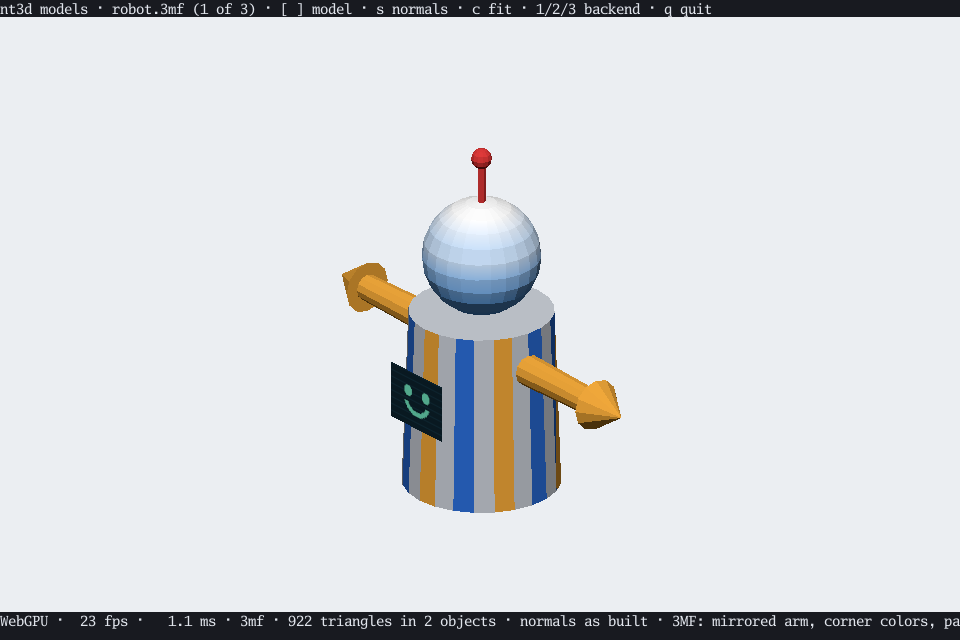
Formats#
| Format | Read | Write |
|---|---|---|
| STL | binary and ASCII, with face colors | binary, with colors |
| OBJ | with materials, textures, and lines | triangles and lines |
| 3MF | with colors, textures, painting, and parts | one object, with face colors |
| PLY | ASCII and binary, including raw scans | binary |
| glTF 2.0 | .gltf and .glb | — |
| SOG | .sog bundles and meta.json folders | — |
STL, OBJ, 3MF, and PLY are built in. glTF is in its own package, nt3d/mesh/gltf, SPZ Gaussian splats in nt3d/mesh/spz, and SOG Gaussian splats in nt3d/mesh/sog; each registers itself when imported, the way image formats do with image. To get every optional format, and WebP textures, import them all at once:
import _ "nimbleterminal.dev/nt3d/mesh/formats"That keeps programs that read no files small: glTF alone adds about 0.6 MB to a WebAssembly build.
The Gaussian decoders (PLY, SPZ, SOG) also group each cloud into clusters at load, which is what lets the renderers draw a budgeted subset: see Gaussian clouds. That costs about 160 ms per million splats (406 ms for 2.5 million on an M5 Max); Options.NoClusters skips it, so loading is faster and every splat is drawn, taking its share off the budget first. Options.SHPalette chooses whether the spherical harmonics are shared through a palette: a SOG’s palette is kept by default, and SHPaletteBuild makes one for PLY, compressed PLY, and SPZ clouds at load (see SH palettes).
Which way is up#
Files don’t say which way is up, and nt3d is Z-up. Many OBJ files are Y-up; set Options.Up = nt3dmesh.YUp to turn them. glTF is always Y-up by its specification, so it is always turned. Units are the file’s own, and nothing is rescaled unless you ask, as Normalization does above.
Staying safe with big or hostile files#
Reading is bounded, so a file can’t exhaust your memory:
Options.MaxTrianglescaps the whole model (DefaultMaxTriangles, 4 million, unless you raise it).- Coordinates must be within ±10¹⁵, and textures at most 8192 pixels a side, checked before decoding.
- 3MF packages are limited to 4096 entries and
Options.MaxBytesunpacked (256 MiB by default). - Side files, like an OBJ’s materials or a glTF’s buffers, are read only through
Options.Open.ReadFileconfines them to the model’s directory;DecodewithoutOpenskips them. Missing ones becomeModel.Warningsrather than errors.
An object bigger than one geometry can hold (nt3d.MeshTriangleLimit(), MaxMeshTriangles at the default limit) is split into consecutive objects that share its name, material, and part. AddTo gives each its own node. A point cloud or Gaussian splat larger than one geometry holds (nt3d.PointLimit(), or nt3d.MaxGaussians, or nt3d.MaxPreciseGaussians with PointStyle.Precise, for Gaussian splats) is split the same way, into slabs along its longest axis, by nt3dmesh.PointPieces; blended slabs sort together on the GPU, so they blend in order to within a depth slice where they meet. The decoders split at the limit in force when they run, so raise it with nt3d.SetBindingLimit or nt3d.AdoptBindingLimit before loading on a device that holds more than the 128 MiB baseline (see Limits). The decoders split at the compact limit; to draw a decoded cloud Precise, set PointStyle.Precise on each object’s geometry and pass it through nt3dmesh.PointPieces again, which re-splits at the precise limit.
Object.Plain marks vertices the file left uncolored, so a viewer can paint them its own way.
Format details#
STL#
Binary and ASCII, including files with several ASCII solids, and VisCAM/SolidView or Magics face colors. Binary files are recognized by their exact length, since their headers may begin with “solid”. Facet normals are recomputed.
OBJ#
Positions (with the r g b vertex-color extension), texture coordinates, normals, polygons (concave ones are split properly), polylines, objects and groups, and material libraries: Kd colors and map_Kd PNG or JPEG textures. Transparent texels are flattened over Kd. Each object or group becomes one Object per material. Faces without normals get flat ones.
3MF#
The core specification and more:
- the production extension’s objects in other model parts
- base materials, and color groups with a color at each corner
- textures (each textured part becomes an object with UVs)
- faces painted in Bambu Studio or PrusaSlicer, each taking the filament covering most of it
- filament colors and names from Bambu Studio, OrcaSlicer, and their relatives
Each build item is a Model.Parts entry with its triangle count, and Options.Parts chooses which to assemble. Model.Unit, Metadata, and Thumbnail (the slicer’s plate picture first) are filled in too.
Over the triangle or byte limit, Decode3MF returns what it learned along with an error wrapping ErrTooManyTriangles or ErrTooLarge. Model.Summary measures the whole build without assembling it, even past the limit: total triangles, distinct meshes, and world-space bounds and surface area, with each Part carrying its own. Together they let a viewer describe a model too big to load, then load only the parts you choose.
PLY#
ASCII or binary, in either byte order: positions, normals, colors, and texture coordinates under their common names; polygons with face colors and MeshLab’s per-corner texcoord lists; and the texture a comment TextureFile names. Unknown elements are skipped.
PLY is how the Stanford scanning repository shares its models, and nt3d reads them: the bunny’s 69,451 triangles take about 25 ms. A raw scan’s range grid becomes a surface joining neighboring samples, without bridging jumps in depth, and vertices with neither faces nor grid become a point cloud.
DecodeConf reads a Stanford .conf file, which places a set of range scans together: the bunny’s ten raw scans assemble into one model of 668,686 triangles.
glTF#
nt3dgltf.Decode reads .gltf files with their buffers and images, and binary .glb files, using qmuntal/gltf. The default scene’s nodes are walked, and each mesh primitive becomes an object placed where its node puts it and named for it.
- Base colors and vertex colors become sRGB vertex colors. Base color textures keep their alpha, and repeat unless clamped.
MASKbecomes a cutout,BLENDtransparency,KHR_materials_unlitunlit, and double-sided materials get back faces.- Roughness and metalness become an approximate highlight. Metals, which glTF colors by their reflected surroundings, show their base color.
- Strips, fans, points, and lines are read. Missing normals are computed flat.
Files that require an extension nt3d can’t honor, such as Draco or meshopt compression, are refused. Animation, skins, and morph targets use the generic animation API. All glTF models retain their hierarchy in Model.Asset, including empty transform nodes. AddTo instantiates it and scene.AnimationClips(root) exposes its clips. Model.Objects, Bounds, and Geometry keep the flattened rest-pose view for existing callers. Static mirrored nodes retain their ancestry, with reflections moved into primitive vertices; animated negative or singular scales remain unsupported by the scene graph.
Normal maps use the generic normal-map path. KHR_texture_transform applies scale, rotation, then offset to each supported texture slot’s UVs, including its texCoord override. Base color and normal maps can use different UV sets and transforms: decoded Geometry.UV and optional Geometry.NormalUV contain the results, so software, GPU, picking and cutout shadows share them. The extension is accepted when required. Emissive/occlusion/metallic-roughness textures remain outside the renderer’s material model; this extension does not add those maps. Authored TANGENT frames are used; without them the loader generates MikkTSpace-compatible ones (see tangent frames).
Authored cameras#
Perspective and orthographic cameras belong to their nodes, including animated parent transforms. Camera-only scenes are supported. No imported camera automatically replaces the viewer’s orbit camera:
root, err := model.AddTo(scene, nt3d.Root, "model")
if err != nil { return err }
cameras := scene.Cameras(root)
if len(cameras) > 0 {
    camera, err := scene.NodeCamera(cameras[0])
    if err != nil { return err }
    frame, err := scene.Frame(camera, width, height)
    // Render frame, or pass camera to the widget's SetCamera method.
    _, _ = frame, err
}
Call NodeCamera again after sampling animation to follow its motion. The returned Camera is a detached snapshot, with Pose holding its orientation and position (-Z forward, +Y up). It preserves roll, vertical YFOV in radians, optional fixed AspectRatio, clipping planes, and orthographic Xmag/Ymag half extents. An omitted perspective far plane stays infinite. Node scale does not scale the lens. Normal viewport aspect is used when the file omits perspective aspect.
These are generic APIs: procedural sources can call SetNodeCamera, or set AssetNode.Camera. The ordinary orbit camera retains its defaults. Orbit/automatic rotation returns an authored view to orbit orientation; pan and zoom retain its roll. Picking rays and perspective skies use the same lens and orientation as rendering.
See the glTF camera specification and KHR_texture_transform for the source conventions.
Writing#
EncodeSTL, EncodeOBJ, Encode3MF, and EncodePLY write triangles; OBJ writes lines too. Nothing is normalized on the way out. nt3dsog.Encode writes a Gaussian cloud whose bands above DC are a palette (see Preprocessing splats) as a SOG bundle.
Preprocessing splats#
Loading a big PLY or SPZ with SHPaletteBuild pays the k-means every time, about 2.5 s for a million degree-3 splats. nt3d-palette, built to bin/ by task build, does it once and writes a file that loads paletted:
nt3d-palette [flags] input.ply|.spz|.sog ...It reads each input (PLY, compressed PLY, SPZ, or SOG), builds a palette with BuildSHPalette, and writes a SOG v2 bundle, which nt3dmesh loads with the default SHPaletteKeep: the palette is the bundle’s shN centroid image and 16-bit labels, nothing new to decode. A SOG input that already holds a palette is copied through unchanged, and a cloud with no bands above DC is written without a palette, with a warning. Inputs are converted in order, and one that fails is reported on stderr while the rest continue. The exit status is 1 when any failed, 2 for a usage error.
| Flag | Default | Effect |
|---|---|---|
-centroids | 65536 | Palette centroids, at most MaxSHPaletteCentroids. |
-iterations | 10 | K-means rounds at each level. |
-max-rms | 0 | Fail, writing nothing, when the palette’s RMS error exceeds this; 0 ignores it. |
-workers | 0 | Goroutines for the build; 0 is GOMAXPROCS. |
-out | The output file (one input only) or directory; a directory is one that exists, or a name ending in a separator, which is created. | |
-i | Write <stem>.sog beside the input and remove the input. A SOG input that is copied through is left untouched. | |
-rebuild | Build a new palette even when the input holds one. | |
-progress | Report the build’s progress on stderr. | |
-quiet | Print no reports, warnings, or progress; errors still go to stderr. | |
-fail-fast | Stop at the first input that fails. |
Without -out or -i, the output is <stem>.paletted.sog beside the input; with -out naming a directory it is <dir>/<stem>.sog. The output is written through a temporary file beside it and renamed into place, so an interrupted or failed run leaves nothing. Each input gets one report line on stdout: the output path, the centroids used and the RMS error (or kept N centroids for a copied SOG), whether -max-rms was met, the SH bytes as per-splat coefficients and as a palette with labels, and the wall time:
scan.sog: 65536 centroids, RMS 0.0412, SH 92.0 MB -> 4.9 MB, 3.1sThe bundle’s images are lossless PNG rather than WebP, since Go has no lossless WebP encoder: nt3dmesh and any reader that decodes images by content open it, but a SOG reader that insists on WebP may not. Positions keep 16 bits in SOG’s log domain and scales, DC, and palette coefficients 8 bits over each attribute’s range, as SOG v1’s linear ranges did, so a reload matches within that quantization. The file keeps the input’s coordinates; Options.Up applies at load as it does for any SOG.