Materials and textures#
A geometry’s Material says how its surface looks: its texture, whether light affects it, and whether it lets things show through. Without a material, a mesh is lit and colored by its vertex colors.
tex, err := nt3d.NewTexture(img) // any image.Image
mat := &nt3d.Material{Texture: tex, Repeat: true, Specular: .4}Textures#
NewTexture takes a snapshot of any image.Image, up to 8192 pixels a side. Textures are sRGB, as images are, and both renderers filter them in linear light.
- Repeat. With
Material.Repeat, texture coordinates outside 0 to 1 wrap around, and filtering blends across the seams, so a texture made to tile shows none. Otherwise they clamp to the edge. The OBJ, PLY, and 3MF readers set it, since those formats tile by default. - Tint.
Material.Tintmultiplies the texture by the vertex colors. - Unlit.
Material.Unlitshows colors as they are, ignoring the light.
Mipmaps#
A tiled floor running to the horizon packs many texels into each distant pixel, and without care it shimmers into moiré. nt3d keeps each texture with copies of itself halved down to one texel, averaged in linear light, and each pixel samples the copies that match how many texels it covers. Frame.Anisotropy (1 to 16; zero means 16) goes further: where a pixel covers a long, thin run of texels, as on a floor seen at a slant, it samples along the run, so the floor keeps its detail instead of blurring to gray. The GPU and software renderers do the same.
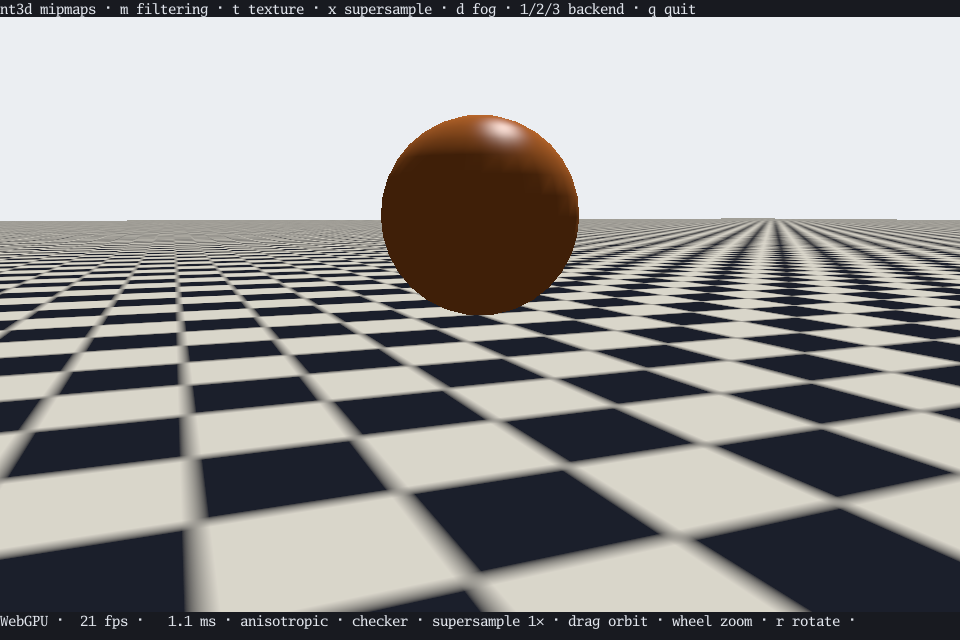
The mipmaps demo lets you turn them off to compare. Shader textures get them too, from the picture the shader draws each frame. Material.FullSize samples a texture full size, without its mipmaps, for comparing or for a texture that must never blur.
Cutout mipmaps#
Averaging a cutout’s alpha would thin it: far off, a strand’s texels blend with the transparent texels around them, fall under the threshold, and the strand vanishes or sparkles. So a cutout samples mipmaps of its own, whose alpha is rank-matched to the full-size texture: at each level, the texel at a given rank takes the alpha of the texel at that rank in the full-size image, as a renderer samples it, so the share of texels above any threshold stays about what it is at full size. One chain serves every threshold at once, which fur needs, since each of its layers cuts the same texture at its own height. Distant fur and leaves keep their density instead of thinning, and stop shimmering. Cutouts filter between levels but take no anisotropic taps, which would average them thin again.
The chain preserves how much shows, not exactly where: a thin strand far off becomes a somewhat wider, shorter one. Thresholds of one half and above hold within a few percent; below that a coarse level shows a little more, never less. It suits alpha that is tested, not blended (transparent materials keep the ordinary chain), and a level whose texels are wider than the shapes can only approximate them: far enough off that a whole tile fits in a pixel, a cutout covering under half its texture disappears and one covering more becomes solid. Shader cutouts sample full size, as the GPU averages the chain of the picture it draws.
Transparency and cutouts#
Material.Transparent blends a mesh over what lies behind it, by the vertex colors’ alpha times the texture’s. Transparent meshes are drawn after everything opaque, farthest first, each with its back faces before its front ones, so a glass sphere shows its far side through its near one. Alpha-blended points sort with transparent meshes by depth slice. Meshes that intersect each other, or the overlapping layers of one curved mesh, can still blend out of order. Wireframe and picking treat transparent surfaces as solid. Press t in the shapes demo to see it.
Material.Cutout instead cuts holes: texels with alpha under Threshold (one half by default) aren’t drawn at all, and the rest are solid. It’s how leaves, fences, and fur are made, and it can’t be combined with Transparent. Picking passes through the holes. Far off, cutouts keep their density through mipmaps of their own.
Material.EdgeOn shows a cutout only where the surface turns edge-on to the viewer, fading it out as the surface comes to face the camera. Fur uses it to fill in silhouettes. Wireframe and picking leave edge-on surfaces out.
Other materials ignore alpha.
Normal maps#
NewNormalMap(img) creates a linear-data normal texture. Assign it to
Material.NormalMap, set NormalStrength: 1, and provide Geometry.UV.
GPU and software perturb diffuse, specular, and environment lighting. See
normal maps for sampling, tangent frames, animation, and glTF mapping.
Highlights#
Material.Specular (0 to 1) adds a white highlight where the surface reflects the light toward the camera, and Shininess (1 to 1024, default 32) sets how tight it is. It’s worked out per pixel, so highlights stay round even on coarse meshes. Boxes, unlit materials, and wireframe have none.
Material.Reflectivity adds environment reflections.
Zero disables them; .02 suits water and 1 makes a mirror. Normal maps also
perturb reflection direction. Unlit materials ignore reflections.
Shader textures#
A texture can be drawn by a WGSL shader each frame, on the GPU, with an ordinary image as its fallback for software rendering:
tex, err := nt3d.NewShaderTexture(source, fallback)The source defines fn nt3dTexture(uv: vec2<f32>) -> vec4<f32>, returning an opaque color, with UVs starting at the top left. The fallback image sets the texture’s size and is what the software renderer shows.
To animate one, pass parameters: NewShaderTextureWithParameters(source, [4]float32{phase, 0, 0, 0}, fallback) exposes them to the shader as nt3dTextureParams, a vec4<f32> uniform at group 0, binding 0. Make a new texture for each step and give it to Scene.SetTexture, with a fallback for the same step. When the source and size are unchanged, the renderer reuses its pipeline and only updates the uniform.
Each frame, the GPU first draws the texture, then the scene that samples it, on the same device and command encoder; only the finished picture is read back. Shaders compile lazily, so a mistake in one is reported when the frame renders. Custom bindings aren’t available.
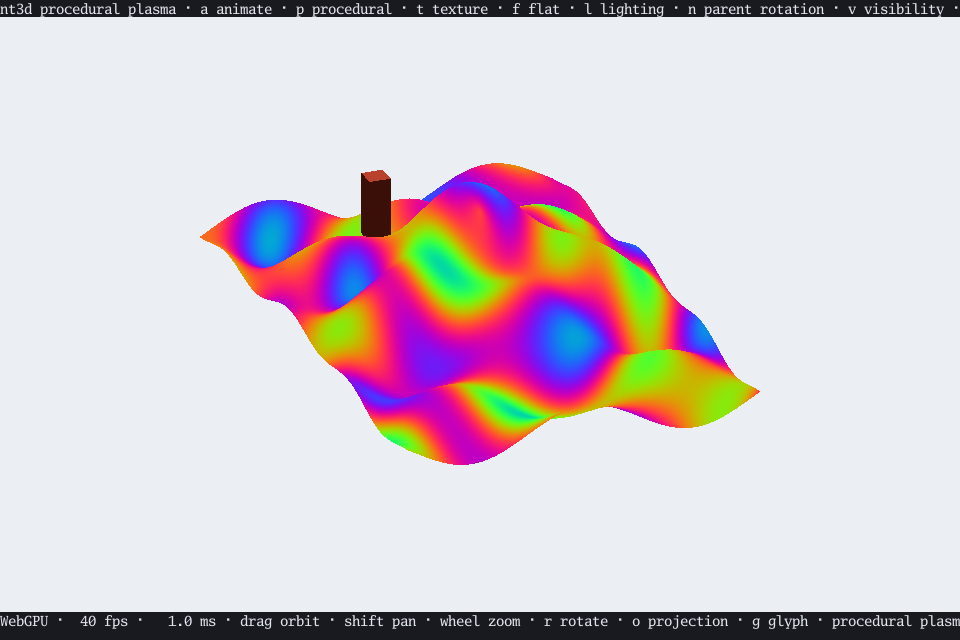
The procedural demo paints terrain with an animated plasma shader; procedural.go has the shader and its matching CPU fallback.
Outlines#
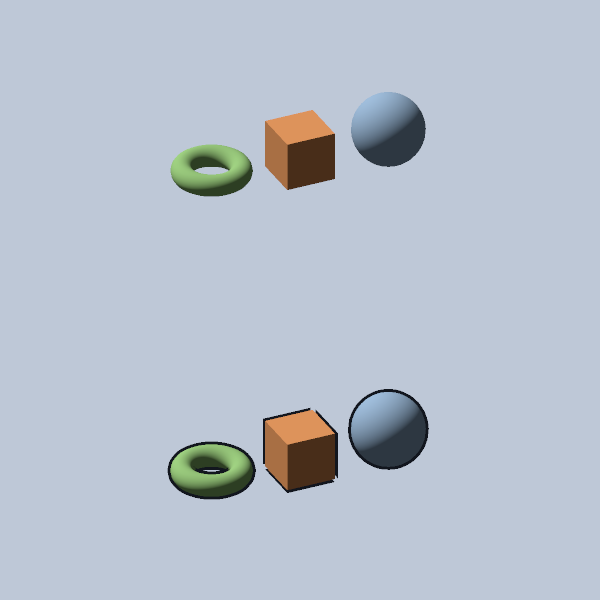
Top: no outlines. Bottom: three-pixel outlines, including the gaps at the cuboid’s split-normal corners.
Give indexed meshes a dark contour with Geometry.Outline:
mesh.Outline = nt3d.OutlineStyle{
    Width: 2, // output pixels; zero disables, maximum 32
    Color: color.RGBA{R: 18, G: 22, B: 30, A: 255},
}
scene.SetGeometry("model", mesh)
The GPU and software renderer draw an expanded back-face hull in an unlit
color, making the outer silhouette stand out against busy backgrounds.
Width stays constant with distance and supersampling. Color uses RGB;
its alpha is ignored. Nearer opaque geometry hides the contour, fog fades
it, and transparent meshes retain their vertex/texture opacity. Cutout
materials keep their alpha test. Morphs and skinning use the current posed
positions and normals; the GPU reuses its mesh buffers for the extra draw.
For a loaded character or an already animated subtree, use
scene.SetOutline(root, nt3d.OutlineStyle{Width: 2}). This preserves the
current pose and shared buffers; pass a zero style to turn it off.
This inexpensive technique works best on closed meshes with smooth, outward normals. Flat or split normals can leave gaps at corners, and open sheets do not acquire a full contour. It outlines the expanded geometry, not sharp creases or alpha-mask boundaries; a back surface can show through holes or glass. Outlines do not change picking or cast shadows. Wireframe keeps its existing edge logic. World-unit widths are not supported yet.
Try the shapes demo: press
b to toggle outlines (also available in the characters demo), s to compare normal styles, and 1 / 2 to compare
GPU and software.
Procedural normal maps#
NewShaderNormalMap(source, fallback) and
NewShaderNormalMapWithParameters(source, parameters, fallback) use the same
nt3dTexture WGSL entry point, returning tangent-space XYZ encoded into RGB
in [0,1]. Alpha is ignored. Assign the result to NormalMap, set
NormalStrength: 1, and animate with Scene.SetNormalMap.
The render target and its mipmaps are linear data, without sRGB conversion.
NormalRepeat chooses tiling or clamping. Software renders the supplied image,
which should evaluate the same pattern and parameters. The water demo
uses this path for periodic ripple normals.
Scene transmission#
Lit materials can sample the opaque scene behind their surface:
material := &nt3d.Material{
    Transmission: .94,
    Refraction:   .018,
    Absorption:   nt3dmath.Vec3{X: .85, Y: .28, Z: .12},
    Reflectivity: .02,
}
Transmission is a 0–1 mix. Refraction is a 0–1 screen offset measured in
fractions of viewport height, directed by the projected shading normal;
normal maps affect it. Zero gives undistorted transmission. Absorption is
nonnegative RGB extinction per world unit: each channel is attenuated by
exp(-coefficient * distance) toward the lit surface color. Distance is the
view-ray segment to opaque geometry, capped at 1000 world units; missing depth
uses that cap. Use Linear rendering for attenuation in linear light.
Transmissive meshes write depth after the opaque scene is captured and before
ordinary transparency. They require normals and cannot use Transparent,
Cutout, EdgeOn, or Unlit. Like transparent meshes, their triangles do not
cast shadow maps. Offscreen and foreground distortion samples fall
back to the original pixel. Only the opaque scene is captured, so stacked
transmissive layers and transparent objects behind them are not composited as
physical glass. Reflections still come from the environment.
Capture textures are private renderer resources. GPU and software share these material controls; procedural texture shaders remain independent of the scene. See Water for the complete example.
Flow-driven normal maps#
Material.FlowMap takes an immutable NewFlowMap(image) field. Red/green
encode signed normal-UV displacement; 127/128 are neutral. The field is sampled
at Geometry.UV vertices, then interpolated per fragment. FlowRepeat wraps
the field rather than clamping it. Use independent Geometry.NormalUV for
ripple tiling.
Set FlowStrength to the displacement scale per cycle and animate FlowPhase
in cycles. Two offset phases crossfade to avoid a discontinuity on reset;
zero strength disables flow. A flow map requires a normal map. It adds no
texture bindings and works in GPU and software, including normal-driven
reflection and refraction. Small field details require correspondingly dense
mesh vertices. Flow changes shading, not geometry or simulation velocities.
See Water for a shoreline example and tiled mesh API.