Fur#
nt3d grows fur on any mesh with shells: copies of the surface pushed out a little further each time, each a cutout showing the cross-section of every strand at that height. Stacked, they read as strands.
coat, err := nt3d.NewFur(nt3d.Fur{Length: .05, Shells: 16, Spacing: .011})
shells, err := coat.Shells(spot) // textured, so the fur takes Spot's colors
for k, g := range shells {
	id, _ := scene.SetGeometry(fmt.Sprintf("fur %d", k), g)
	scene.SetTransform(id, coat.Sway(k, wind)) // each frame, to animate
}
The coat#
FurCoat.Shells(base) returns an opaque skin plus one cutout layer per shell. Each strand has its own place, length, and taper.
- Spacing sets about how far apart strands grow, in world units. Density instead sets how many strands cross the texture.
- Color. A textured mesh colors its fur from its texture and wears the texture as skin. Otherwise strands run from
Rootcolor toTipcolor. - Any mesh. A mesh without texture coordinates gets them projected from its faces, in world units, and flat-shaded meshes (as STL, 3MF, and PLY files often are) get averaged normals so the shells stay closed. Any mesh file can be furred directly.
Fur is light on memory. An untextured mesh’s fur repeats a tile of 64 strands, so dense fur costs nothing extra. A textured mesh’s fur, colored strand by strand, uses one texture of up to 512 strands: (4 × density)² × 4 bytes however many shells, about 7 MB for Spot’s demo coat. Every layer shares that texture; its alpha is the height each strand reaches, and each layer cuts it at its own Material.Threshold.
Short strands show most at the lower layers, which makes fur look darker deeper in, as real fur does.
Every layer samples the texture’s coverage-preserving mipmaps, so a distant coat stays as dense as a near one instead of thinning away; m in the demo compares it with full-size sampling.
Wind#
FurCoat.Sway(shell, v) is a node transform that bends the fur, as wind or gravity would. A uniform sway moves a whole layer, so animating it uploads no geometry.
Fins#
Seen edge-on, shells show as dashes: the technique’s known weakness. FurCoat.Fins(base) fixes it with a strip of strands standing on every edge, shown only where the surface turns edge-on to the viewer (Material.EdgeOn), so the silhouette fills in. Fins are tinted from the base’s texture or from root to tip, and stand straight when the shells sway.
In wireframe, the coat draws as its outer outline.
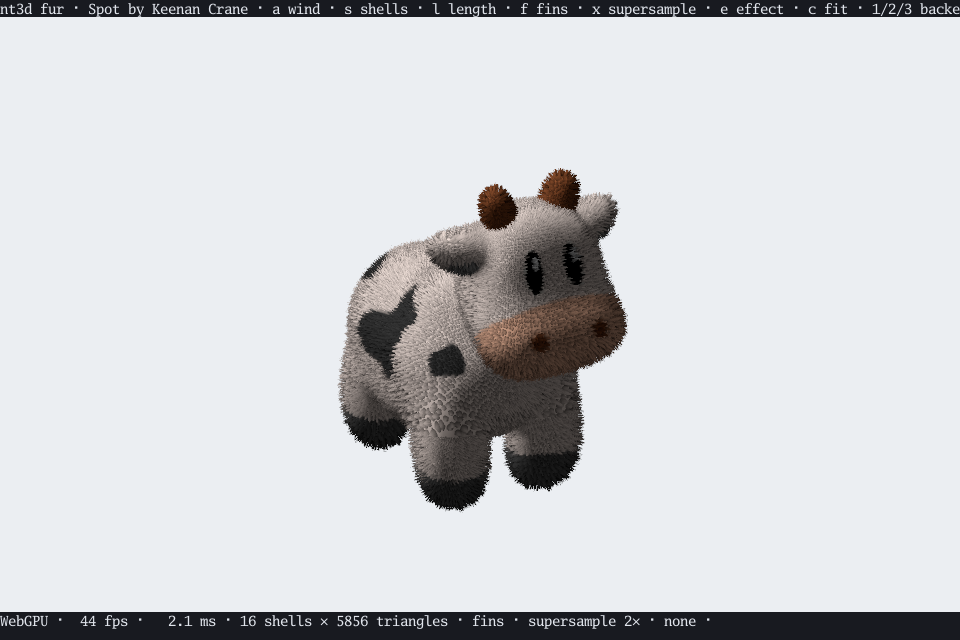
The fur demo shows Spot the cow in a swaying coat; press x for supersampling and e for post effects.